

Google has put an end date on the Chromebook. ChromeOS now has an official expiry date, and its replacement, the Googlebook, is already in stores. Your Chromebook won’t stop working tomorrow, but there’s a date worth knowing, some fine print most headlines skipped, and one big question: is the Googlebook a laptop you’d actually want to own?
What Is a Googlebook?
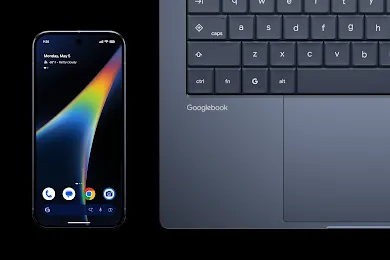
The Googlebook is Google’s new kind of laptop. The first models went on sale October 4 in the United States and October 5 in Canada, the UK, and several other countries, from five familiar names: Acer, Asus, Dell, HP, and Lenovo.
Googlebooks start at about $899 US ($1,299 Canadian), and some models reach around $1,300 US. Every launch model has at least 16 GB of memory, a modern processor, and a high-quality screen. That puts the Googlebook laptop up against Windows laptops and MacBooks, not budget Chromebooks.
Googlebook vs Chromebook: What’s Actually Different?
Google’s big selling points are Android phone apps and its Gemini AI assistant. But Chromebooks have run Android apps for years, so what’s new?
The real change is under the hood. On a Chromebook, Android apps run inside a container, a walled-off copy of Android sitting on top of ChromeOS. That extra layer is why they’ve always been hit and miss in how well they run. A Googlebook is built on Android itself, so apps run natively. Google promises faster, more reliable apps in proper laptop windows. I’d like to see independent reviews before I label this a complete success, but it’s a genuine change in functionality.
The Googlebook’s Android foundation brings two more differences:
- A built-in phone connection. Sign into the same Google account on your Android phone and Googlebook, and they link automatically. You can open phone apps on the laptop and grab photos and files without emailing them to yourself. iPhone owners, on the other hand, only get messages and notifications on their Googlebook.
- Gemini AI from the ground up. The Magic Pointer offers suggestions about whatever your mouse is hovering over, and Create My Widget builds custom desktop widgets from a plain-language request. The Googlebook puts Google’s Gemini AI at the core of everything you do.
Plenty stays familiar: a Chromebook-style desktop, Chrome front and centre, and a promise of up to ten years of updates.
What Happens to Your Chromebook?
Your Chromebook will keep getting updates until its own scheduled end date. What’s new is a bigger date: Google has confirmed that Chrome OS will get updates and security patches through mid-2034, after which the Googlebook software takes over.
Here’s the fine print. Google previously promised newer Chromebooks ten years of updates, so one bought this year would expect support until around 2036. Google says it will help newer models move to the Googlebook software, but it hasn’t said which ones qualify, only that older and lower-end models won’t.
How to Check Your Chromebook’s Update Date
For most people, the date that matters is their own Chromebook’s end-of-support date. To find out what yours is, click the clock in the bottom-right corner of your desktop, click the gear icon to open Settings, choose About ChromeOS, then Additional details. You’ll see the month and year your updates end.
That date is based on when your model first came out, not when you bought it. My 2019 Chromebook stopped getting updates in June 2025. Once the date passes, it keeps working, much like a PC after Windows 10 end of support. It’s fine for recipes, videos, and the news, but I’d skip online banking, shopping, and anything involving passwords.
Is the Googlebook Right for You?
Cost. At $899 and up, the Googlebook has left the budget world behind. Its free trials, including Google AI Pro and three months of YouTube Premium, are designed to become monthly bills, so you’ll need to decide if you want to take on more monthly expenses. (More on that in our video and post on open-source vs subscription software.)
Ownership. Ten years of updates is a long life for a laptop. But as the ChromeOS story shows, Google decides when platforms end and which devices move on. You own the hardware; the platform belongs to Google. (More on that pattern in our video: Planned Obsolescence: Is It Greed?)
Privacy. The Magic Pointer watches your screen, and widgets can draw on your email and calendar. Google says some AI work happens on the laptop itself, but there’s no way to switch off all sharing with its servers, and no master switch for its AI features.
So the Googlebook probably isn’t for you if you’re on a budget, use an iPhone, or want to keep your tech and information in your own hands. Keep using your Chromebook until its update date, and if an older laptop is gathering dust, consider giving it a second life with Linux.
To be fair, the Googlebook is secure, simple, and well thought out. If you already use an Android phone and live in Gmail, Google Photos, and Google Calendar, it could be a great fit.
Check out the video at the top of this page for the full Googlebook vs Chromebook breakdown.
Discover more from tektoc
Subscribe to get the latest posts sent to your email.